- Under this section, the user shall be able to configure accounts based on hierarchy and permission level assigned to that account
- Admin will have access to create one or more accounts
- Account create access will get change from based on the hierarchy and access given to that particular user
- Account tree will look like this
- zMessenger Pvt Ltd
- DigitalX
Labs
- AdStudio
- Lucky 1
- PR Studio
- Digital
Services
- iBid365
- OmAstro
- Digital
Marketing
- MessageHub NG
- DigitalX
Labs
- zMessenger Pvt Ltd
- When a user is selecting Account he or she
will get access to view following in the dashboard
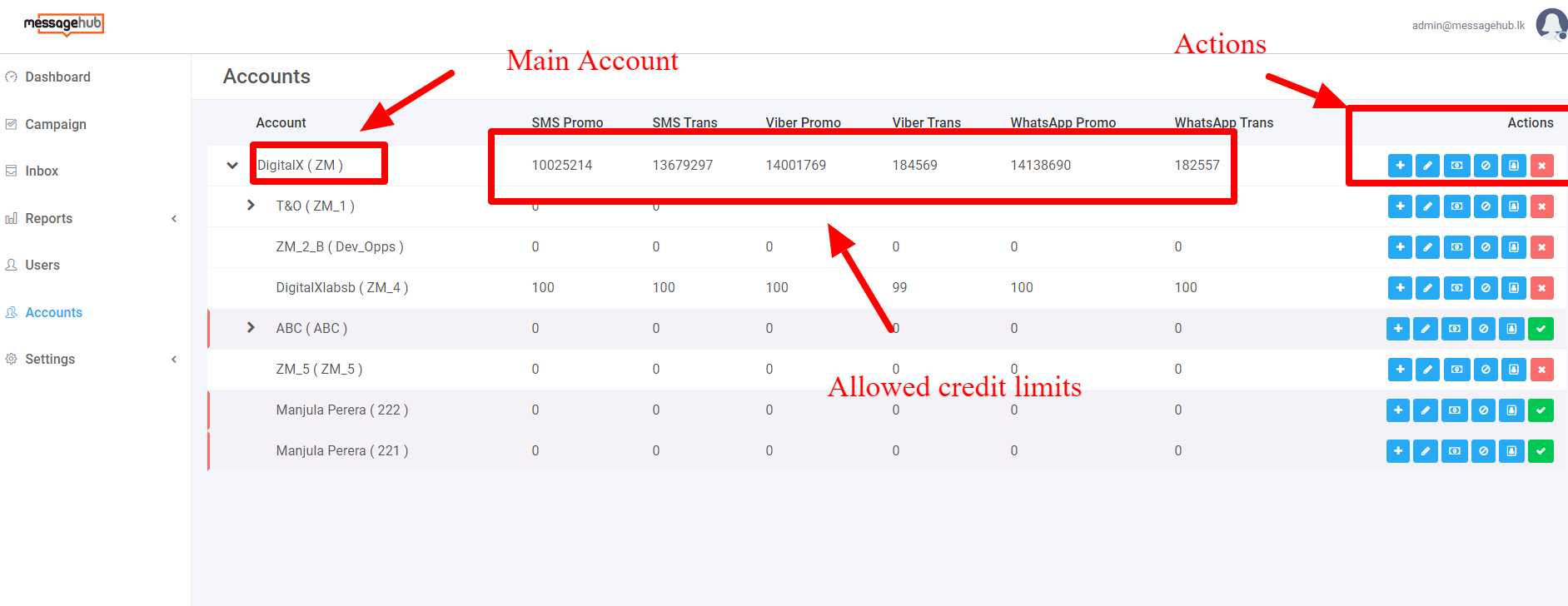
- Account and Sub Account name
- The total Credit limit for the SMS promo
- The total credit limit for the SMS transaction
- The total credit limit for the viber promotion
- The total credit limit for the Viber transaction
- The total credit limit for WhatsApp promotion
- The total credit limit for WhatsApp transaction
- A user can share credit limit from Main accounts to Sub accounts
- Under this section user will get access to
do following activities
- Create Sub Accounts
- Edit Sub Accounts
- Manage Quota - Manage and transfer quota
- Blacklist Account
- Add Account to Whitelist
- Delete this account
- Button description for Account dashboard section
|
Button |
Redirect page |
Condition |
Description |
|
Add Account |
Add Account Page |
N/A |
Admin will get an access to create new account |
|
Edit Account |
Edit the Account page |
N/A |
Admin will get an access to edit an account |
|
Message Quota |
Transfer Message Quota screen |
Main account should have required message quota for transfer |
User will get access to transfer message quota from one account to other sub-account |
|
Blacklist numbers |
Upload/ Add number blacklist |
There should numbers in the contact list if blacklisting |
User can blacklist the numbers in the account section |
|
Whitelist Numbers |
Upload/ Add number Whitelist |
There should numbers in the contact list if whitelisting |
User can whitelist the numbers in the account section |
|
Delete Account |
Delete option to remove the selected account |
N/A |
User will get access to activate/ deactivate the account |
- Refer screen below for more information on Dashboard -
¶ Add Account
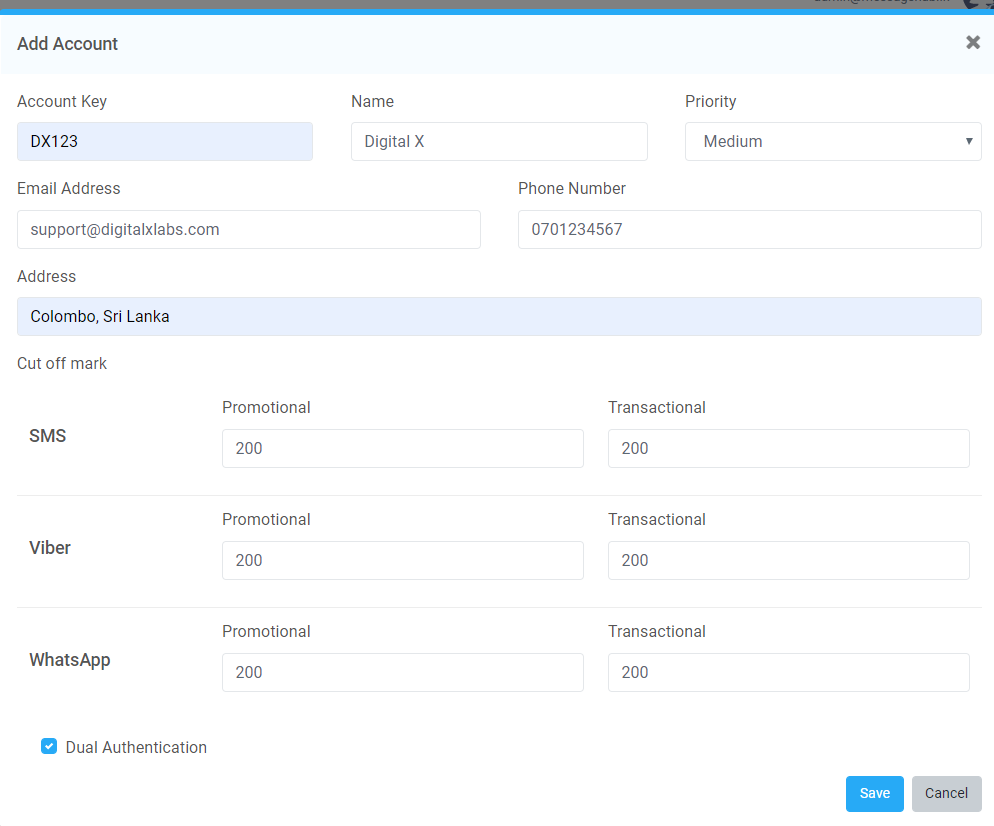
- This is the place where a user will get access to create sub-accounts.
- A user can perform Account creation activity based on the permission given by the Super Admin user
- A user can create a sub-account from an account.
- There can be one or more sub-accounts for an account.
- Parameter description for creating an account
|
Parameter |
Field type |
Validation |
Usage |
|
Account Key |
Text Box |
Mandatory, Maximum of 10 characters |
User to enter the Account which is used as access key for that selected account Account key can be used only for one account |
|
Account Name |
Text box |
Mandatory, Maximum of 50 characters |
Name of the account |
|
Priority |
Drop Down |
Default = Select [Low, Medium and High] |
User can select the priority for the account he or she is creating |
|
Email address |
Textbox |
Optional, Maximum of 100 characters Email address should get validated with following conditions - http://bit.ly/2Nqh5p1 |
User to set the email address for the account he or she is creating |
|
Mobile number |
Text box |
Mandatory, Integer, maximum of 10 to 15 characters |
User to enter the mobile number |
|
Address |
Textbox |
Optional,maximum of 100 characters |
Location of the Account |
|
Cut off Mark |
Text box |
Optional, Integer, Maximum of 5 characters |
It is the place where the low credit limit notification is sent to the selected account as an email SMS, Viber and WhatsApp Transactional and Promotional |
|
Dual Authentication |
Checkbox |
Default - Unchecked |
The person who creates a campaign cannot approve it, it should be approved by another one |
- Button description for Account Creation
|
Button |
Redirect page |
Condition |
Description |
|
Save |
Account Page |
User must fill the required information before creating an account |
User can save and create an account |
|
Cancel |
Cancel creating an Account |
N/A |
User can proceed to cancel creating an account. |
- Refer screen below for “Creating an Account” -
¶ Edit Account
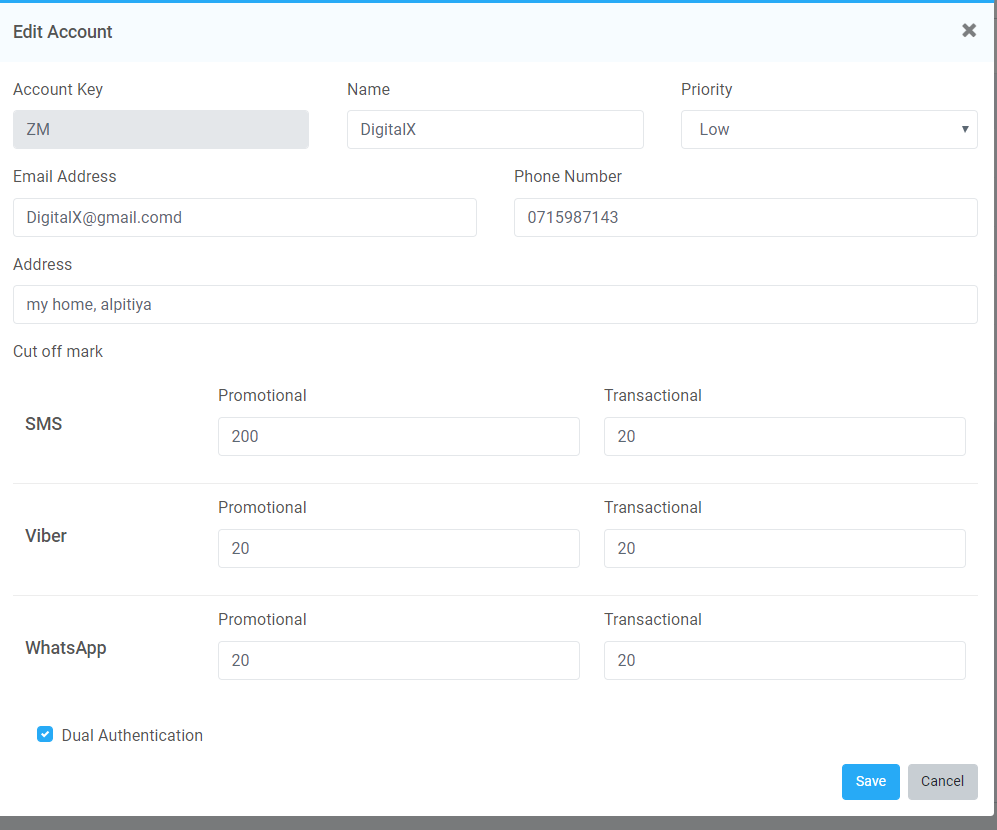
- Under this section, a user will get an access to edit the account based on the given permission
- Users will get access to edit all the fields except “Account Key”. Here the Account Key will remain stable.
- User can save if there are any changes made only
- Refer the screen below for more information -
¶ Transfer Message Quota
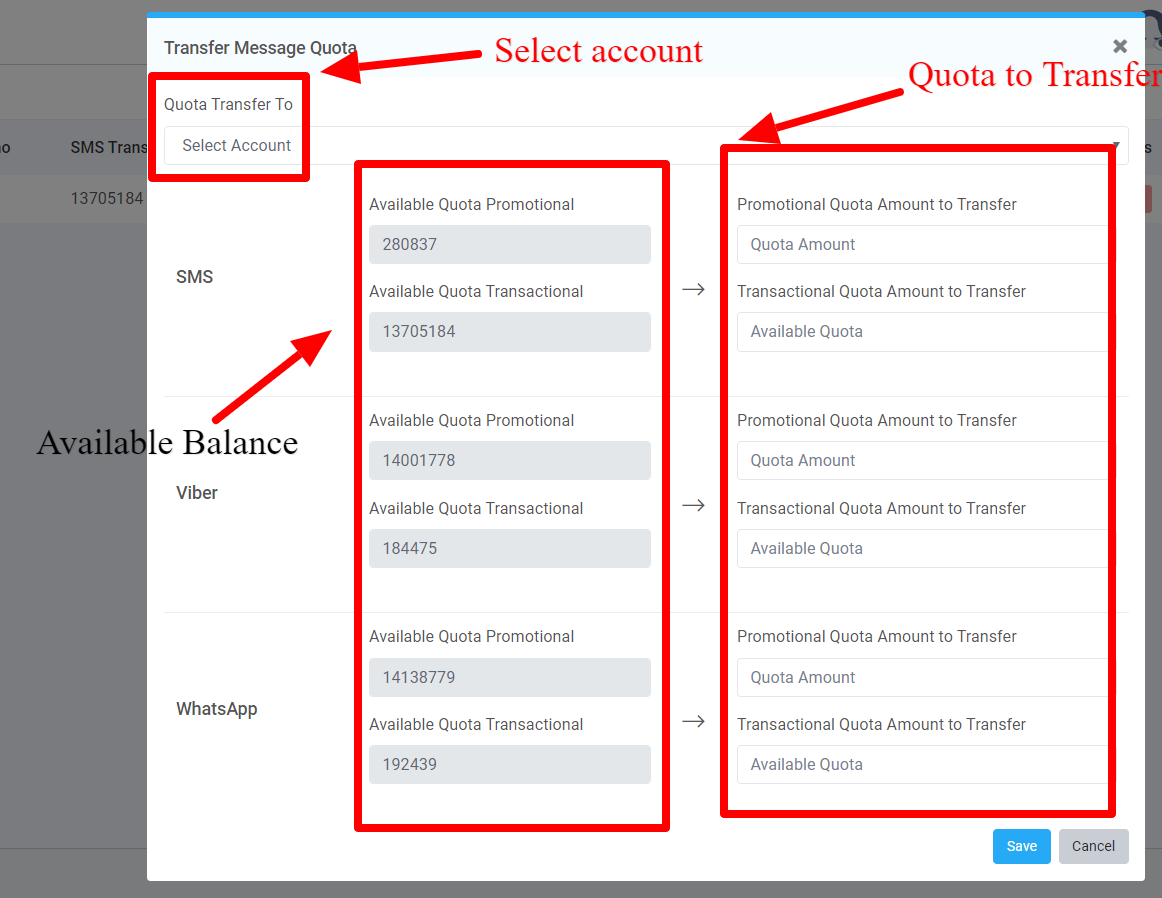
- It is the place where a user will get an access to transfer message quota from parent account to Child account
- Based on the selected account the total available message quota will get displayed in the left side corner as a label
- Under this section user has to select the account to which the message quota should get transferred
- Scenario -
- User is selecting Digital X Labs Account which has quota amount of 100 Credit limit for both Promotional and transactional
- Under that section, the user is selecting the account for Digital X Labs Finance team
- Their user can transfer the preferred amount for the selected account
|
Parameter |
Field type |
Validation |
Usage |
|
Quota Transfer to |
Dropdown |
Default = Select Account User to select account. Based on the created account the list will get displayed |
User will get an access to transfer quota from one account to another account |
|
Available Quota |
Label |
N/A |
User will get an access to view quota available for each channel for the selected account |
|
Amount to Transfer |
Textbox |
The quota should not exceed the limit of available quota |
User will get an access to transfer quota based on the available quota |
- Button description for transferring quota
|
Button |
Redirect page |
Condition |
Description |
|
Save |
Account Page |
User must fill the required information before creating an account |
User can save and transfer quota |
|
Cancel |
Cancel creating an Account |
N/A |
User can proceed to cancel transferring quota |
- Refer screen below for more information -
¶ Blacklist Numbers
- Based on the certain violation and condition user can blacklist or block mobile numbers under this section
- Here a user must select a user account and can enter phone numbers to blacklist
- User shall be able to blacklist contacts based on accounts and based on the below conditions
|
Incident |
Action |
|
Parent Account to Parent Account |
Skip sending messages to blacklisted numbers from parent to parent account. Update those numbers to the log as failed messages |
|
Blacklisted in Parent Account sending message in Child account |
Skip sending messages to blacklisted numbers and from child to parent accounts. Update those numbers to the log as failed messages |
|
Blacklisted in Child account and sending in Parent Account |
The message should be sent to the selected channel successfully with the blacklisted numbers. Update those numbers to the log as success messages |
|
Child to the child account |
Skip sending messages to blacklisted numbers from child to child account. Update those numbers to the log as failed messages |
- User can blacklist mobile numbers in the following ways
|
Ways |
Action |
|
Bulk uploading and blacklisting |
|
|
Typing numbers manually |
|
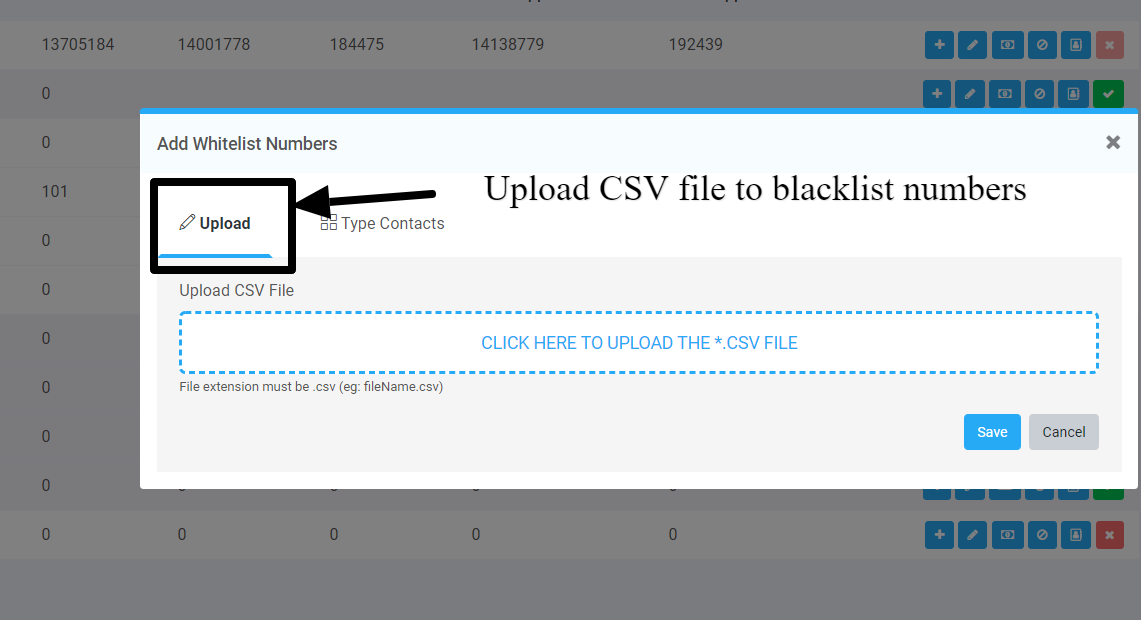
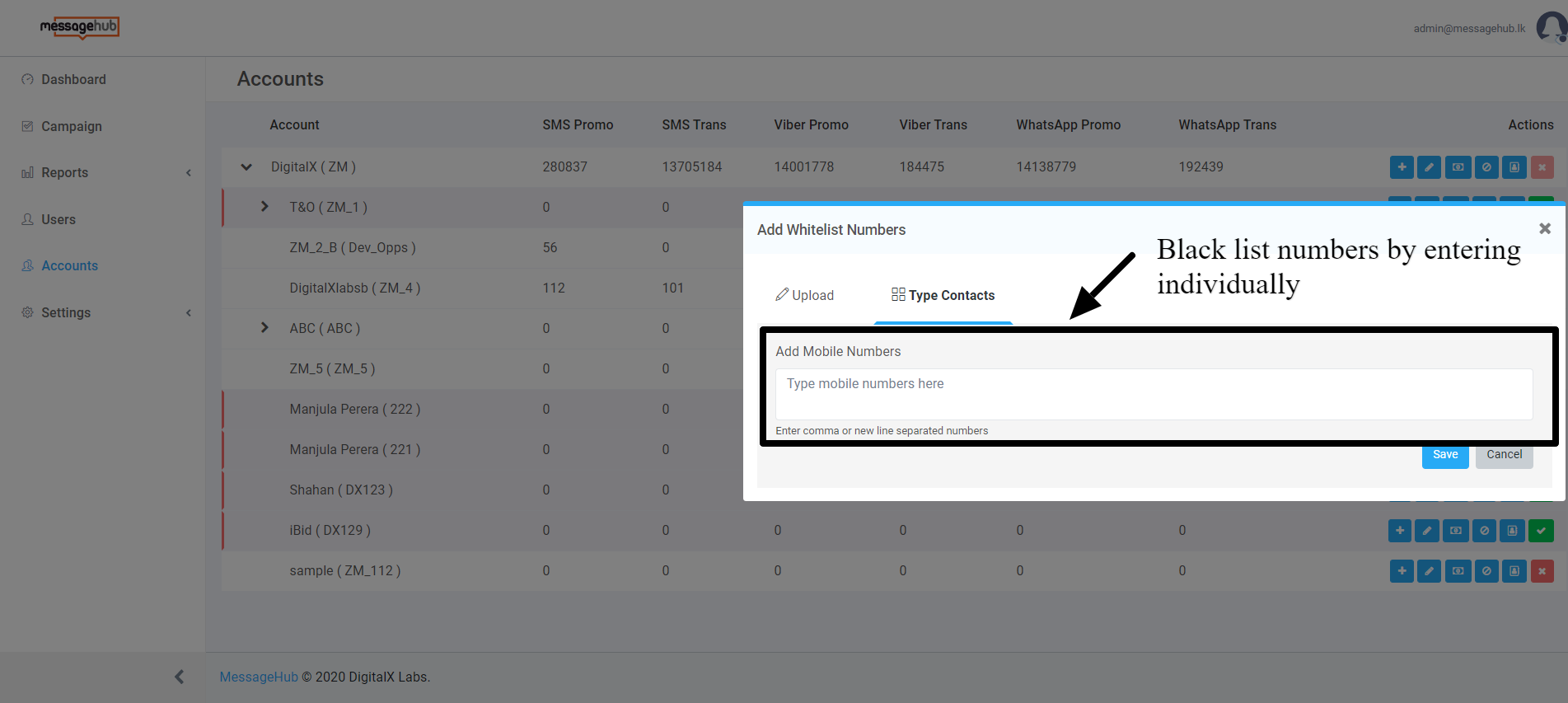
- Users can view the Blacklisted numbers in the Settings section under Blacklist. Refer Setting Section For more information.
¶ Whitelisting Number
- Before starting with the campaign there are certain testing that needs to be taken care of from the client end. For that user, shall be able to create phone numbers and allocate them to the whitelisting.
- Those whitelisted numbers will be uploaded under this section.
- Numbers whitelisted based on the selected accounts
- User can whitelist numbers based on the following ways
|
Ways |
Action |
|
Bulk uploading and whitelisting |
|
|
Typing numbers manually |
|
- Refer screen below for number blacklisting - Refer Account 7 & 8
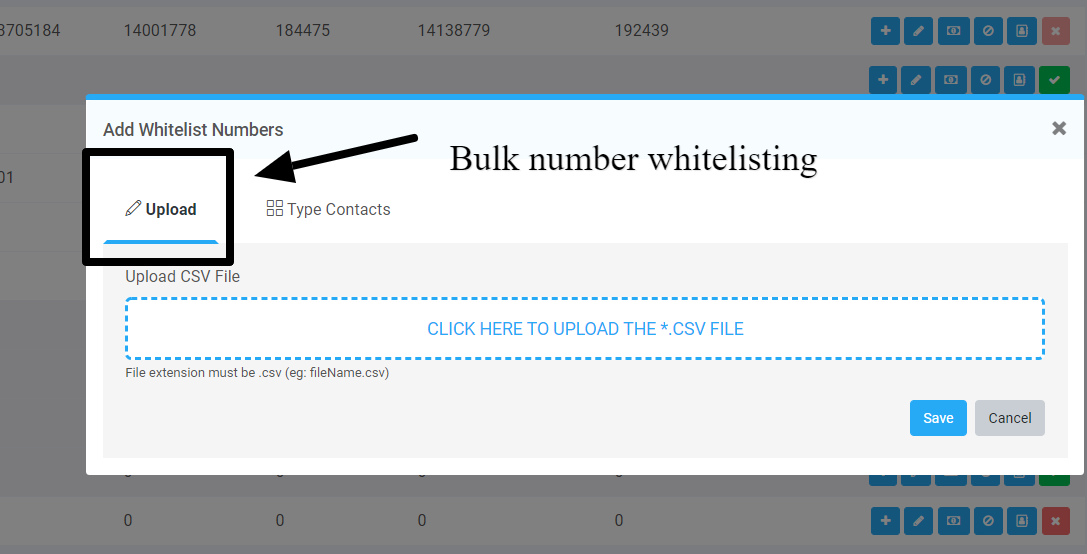
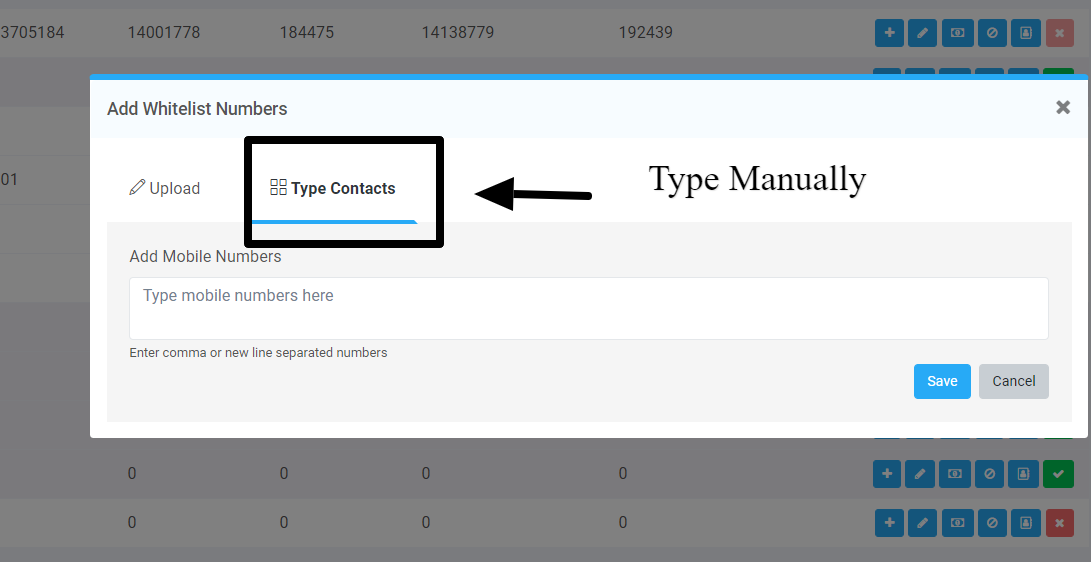
- Users can view the whitelisted numbers in the Settings section under Whitelist page.Refer Setting Section For more information.
¶ Account Activation and Deactivation
- Under this section the user can Activate or Deactivate an account with a simple click
- As default after creating the account will be deactivated
- User cannot activate or deactivate main parent account
- User will get control over to manage account that was assigned to him or her
- Color index
- If is True and in green color - Account is Active
- If False and in Red color - Account is deactivated