¶ Campaign Management Flow
.png)
¶ Campaign Dashboard
- The campaign is a series of activities carried out by a company for informing, reminding or persuading its target audience about its product or service.
- The campaign can be created for both bulk and individual transaction purpose.
- Under this section,campaign is divided into 2
sections as
- Promotional Campaign
- Transactional Campaign
- Under this section, the campaign can be carried
out in 3 different channels
- Via SMS
- Via WhatsApp
- Via Viber
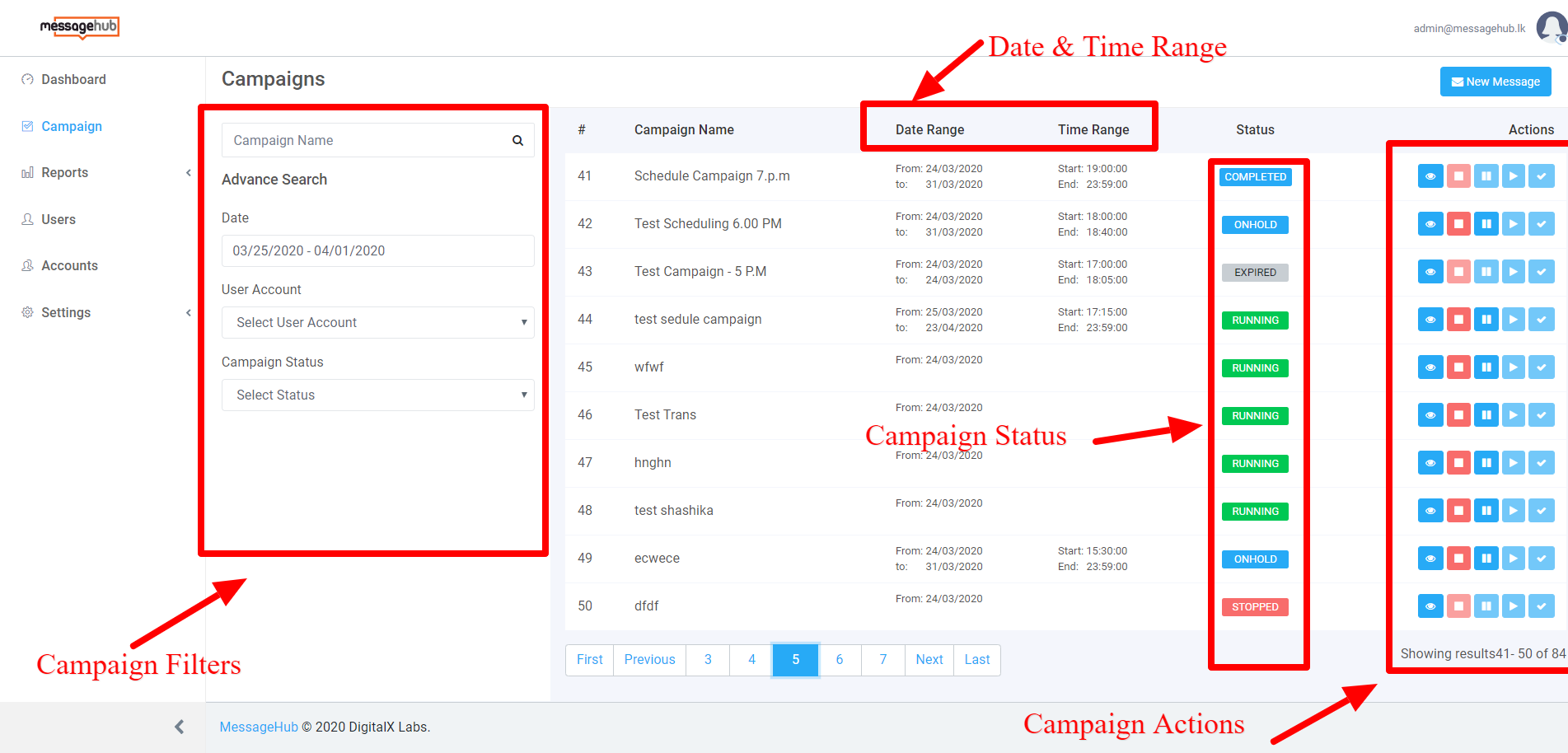
- As soon as after selecting the campaign page the user will be redirected to view Campaign Dashboard
- Under the dashboard section, the user can view the
list of campaigns with the relevant information
- Campaign Id
- Campaign name
- Date Range - From and To Date
- Time Range - Start and End time
- Status of the campaign - Campaign color label will depict the campaign status
- Action items - View, Stop, Play, Pause and Approve
- The user also can filter campaign based on the
following criteria
- Based on the campaign name
- Based on Date - From and To Date
- Based on user account
- Based on campaign status
- Parameter description for Campaign search filter
|
Parameter |
Field type |
Validation |
Usage |
|
Campaign Name |
Textbox |
Optional, Maximum of 30 characters |
User can enter the name of the campaign |
|
Date |
Date |
Optional, Start and end date of the campaign |
User can select the start and end date of the campaign Filter campaign based on the no of days and day wise |
|
User Account |
Dropdown |
Default = Select User account (List of accounts that are created from Account section) |
User can select account and view campaign - View account based on campaign |
|
Campaign Status |
Dropdown |
Default = Select Status (Pending, Approved, Rejected, Expired, Completed, Stopped, Running, Onhold, Low credit) |
User can filter campaign based on Campaign Status. |
- Status description for Campaign Management dashboard
|
Status |
Status Description |
|
Pending |
The campaign was created and under queue status |
|
Approved |
It is a permission-based campaign approval. One person can create a campaign and another will approve it for the next step (Based on the hierarchy). If the campaign is good to go. User can Approve it |
|
Rejected |
It is a permission-based campaign approval. One person can create a campaign and another will approve it for the next step (Based on the hierarchy). If the campaign is not good to go. User can Reject it |
|
Expired |
When the scheduled campaign was expired |
|
Completed |
Once the campaign was completed |
|
Stopped |
When running the campaign was stopped manually |
|
Running |
The started campaign will be under the running status |
|
On-hold |
The Running campaign which was moved to the on-hold status |
|
Low Credit |
Credit is low to run a campaign in the selected account / Continue running the campaign |
|
Paused |
When running campaign was paused |
- Action section Button description
|
Button |
Redirect page |
Condition |
Description |
|
View Campaign |
View Campaign Page |
N/A |
User can navigate to view the campaign |
|
Stop Campaign |
Stop running campaign |
The campaign should be under the following status
|
User can stop running campaign based on the circumstances |
|
Pause Campaign |
Pause running campaign |
The campaign should be under following statuses
|
User can pause a running campaign |
|
Immediate Start |
Start the campaign |
The campaign should be under following statuses
|
User can restart the campaign |
|
Approve Campaign |
Approve the campaign |
The campaign should be under pending status |
User can Approve another user’s campaign or admin will have access to approve the campaign |
- If a user wanted to create a new campaign he or she should click on the “New Message”, button to create a new campaign.
- Refer screen below for more information
¶ Campaign Creation Management
- Under this section, Campaign is divided into 2
sections
- Promotional Campaign - Promotional campaign is a series of advertisements using various marketing tools that share similar messages and thoughts to promote a business or an event. Under this section Promotional campaign is carried out using different channels like SMS and Viber. Here authorized users can send promotional messages including images through this page. If a contact person is not using Viber authorized users can send messages via SMS.
- Transactional Campaign - Transaction related messages are sent via the transactional campaign. As Payment Messages. This campaign is carried out using SMS, Viber, and WhatsApp. Here authorized user can send any transaction messages through this page. If a contact person is not using Viber he or she can receive messages through SMS.
- Parameter description for creating a campaign
|
Parameter |
Field type |
Validation |
Usage |
|
Message Detail |
Radio Button |
Default = Promotional [Promotional and Transactions] |
User can select the campaign type under this section |
|
Campaign Name |
Text box |
Mandatory, Maximum of 40 Characters |
User can enter the name of the campaign |
|
Account |
Dropdown |
Default = Select an Account [All the accounts names from account section will get listed] |
User can select the relevant account for the campaign |
|
Priority |
Dropdown |
Default = Select Priority [Low, Medium, and High] |
User can select the Priority for the campaign he or she is going to carryout |
|
Channels |
Checkbox |
Default = Not selected [SMS and Viber for Promotional] [SMS, Viber, and WhatsApp for Transactional] |
User can select the preferred channel |
|
Sender ID |
Dropdown |
Default = Select ID ID is updated to the selected account which is generated from API given by the selected channel |
User can select the sender ID for the account |
|
Add Mobile Numbers |
Text box |
Optional, Integer maximum of 12 characters per number
|
Users can add the mobile numbers manually for which the campaign is going to run. |
|
Upload contact |
CSV file |
|
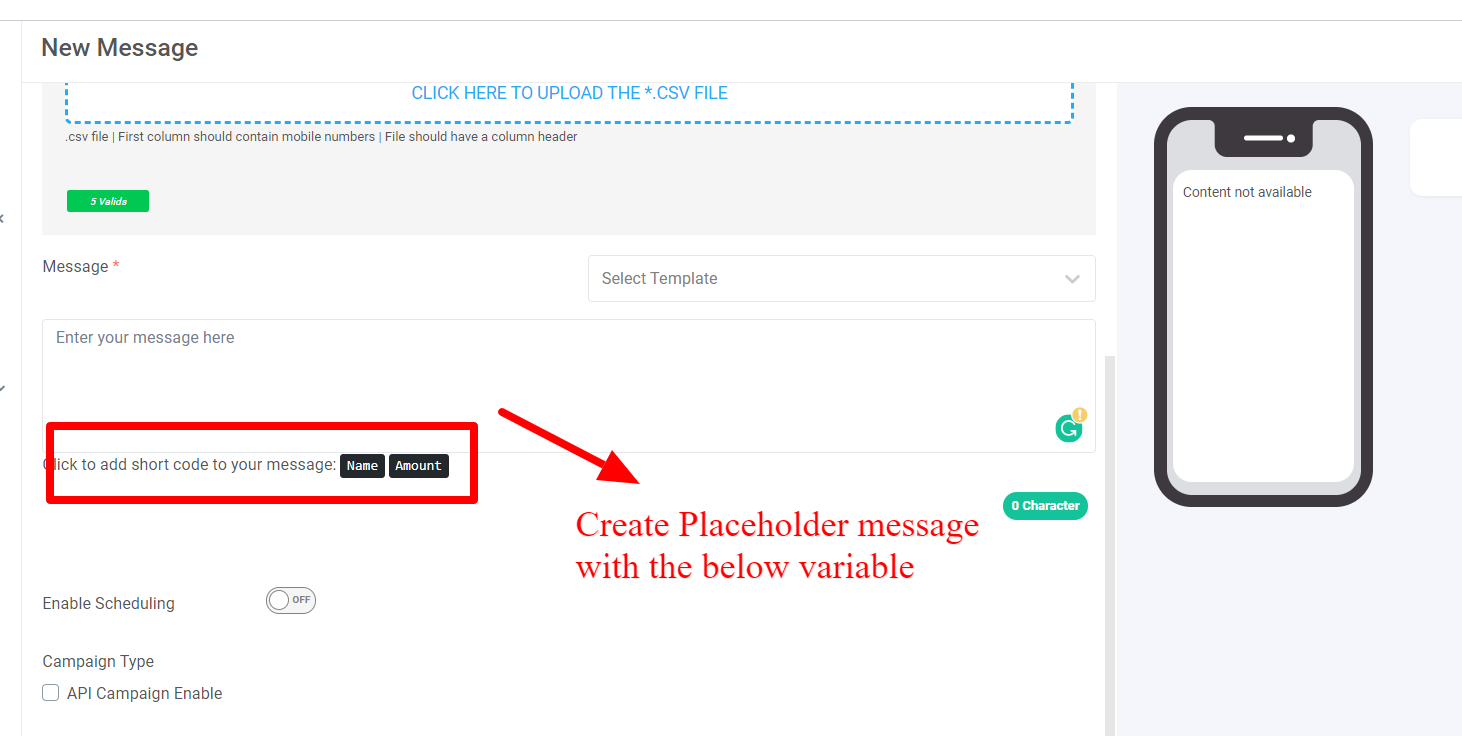
Users can upload the mobile numbers in CSV format for which the campaign is going to run. Here user also can configure the placeholder messages based on the number that he or she is uploading with the following condition
|
|
Message |
Text box |
Mandatory, Maximum of 200 characters |
User can enter the message for the campaign he or she is going to send for the campaign |
|
Link |
Text box |
Mandatory, Maximum 100 characters, supports link |
User has to enter the link which is going to displayed to the end audience Applicable only for Viber or WhatsApp |
|
Set Button text |
Textbox |
Mandatory, Maximum of 15 characters |
User to setup the button text Applicable only for Viber or WhatsApp |
|
Upload Image |
Choose |
|
Users can upload the image that they wish to send. Applicable only for Viber or WhatsApp |
|
Select Template |
Dropdown |
Default = Select Template
[Template will be displayed based on the selected account] |
User can view the SMS template instead of creating a new SMS Based on the account the template will get displayed (Refer Setting Page for Template Management) |
|
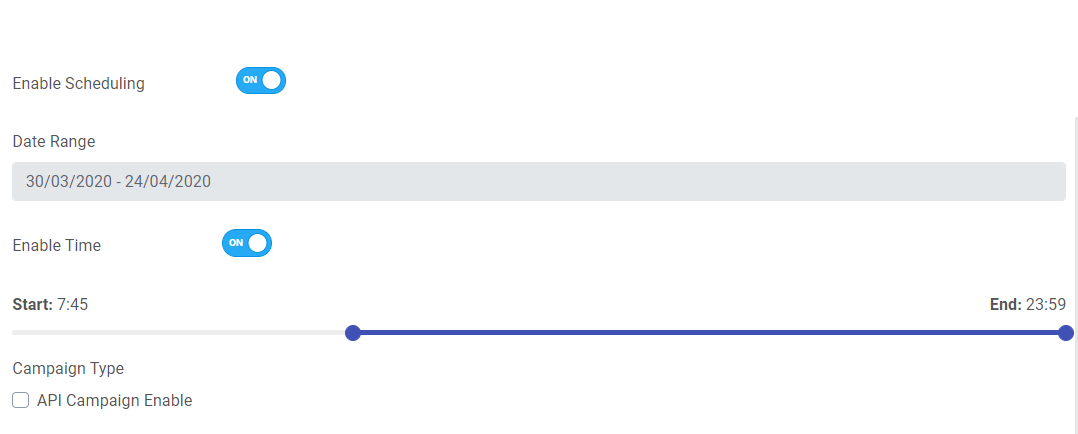
Enable Scheduling |
Toggle |
On - Select date range (Start and end date). Off - Disable the Date range field |
User can select the campaign date range |
|
Enable Time |
Toggle |
On - Enable start and end time for the campaign
Off - Disable the time field |
User can select the start and end time for the campaign he or she is going to run |
|
API Campaign Enable |
Checkbox |
Default - Uncheck Enable or disable the API campaign |
User to enable or disable the new campaign as API campaign |
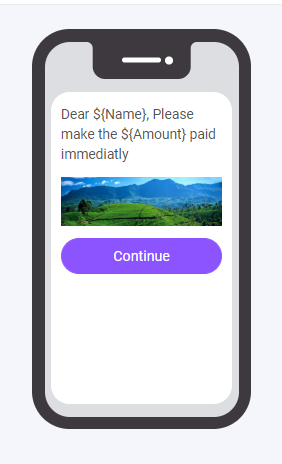
- Whenever a user is entering the message in the message sectio he or she will be navigated to view text, images and button description are getting filled and represented as a view for the user to decide to take a decision on the view of the message.
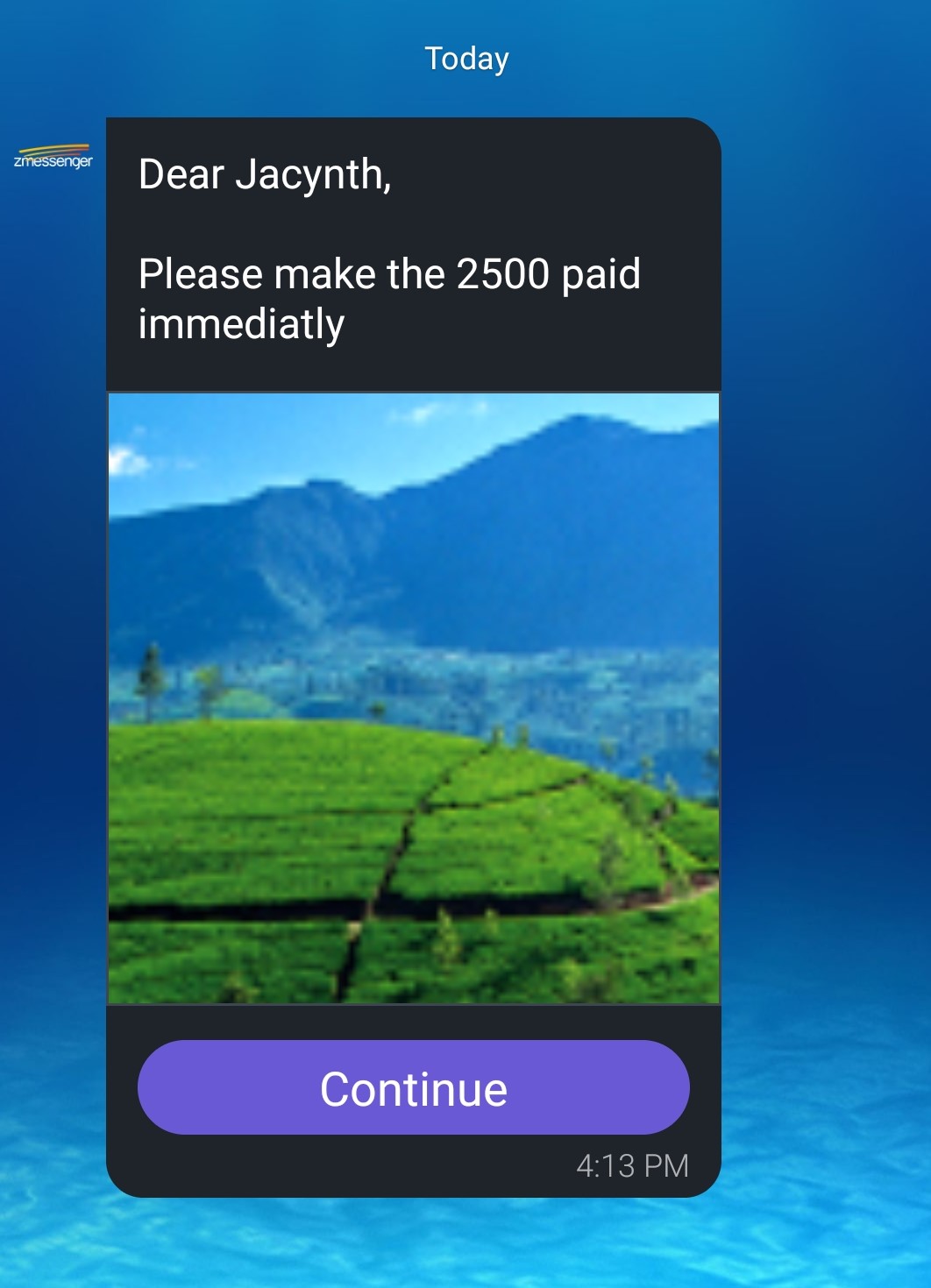
- Similar view will be displayed to the end user.
- Refer screen below. -
- Refer screen below for Placeholder campaign message view -
- There is a section is the campaign called Potential reach which will display no of mobile number which will receive the message.
- There are 2 radio buttons
- Send to All selected channels - Send message to all the selected channels
- Send to the next channel if one channel got failed - Send message to next channel if main channel got failed. If a message is getting failed in Viber, send it to sms.
¶ Contact List Management
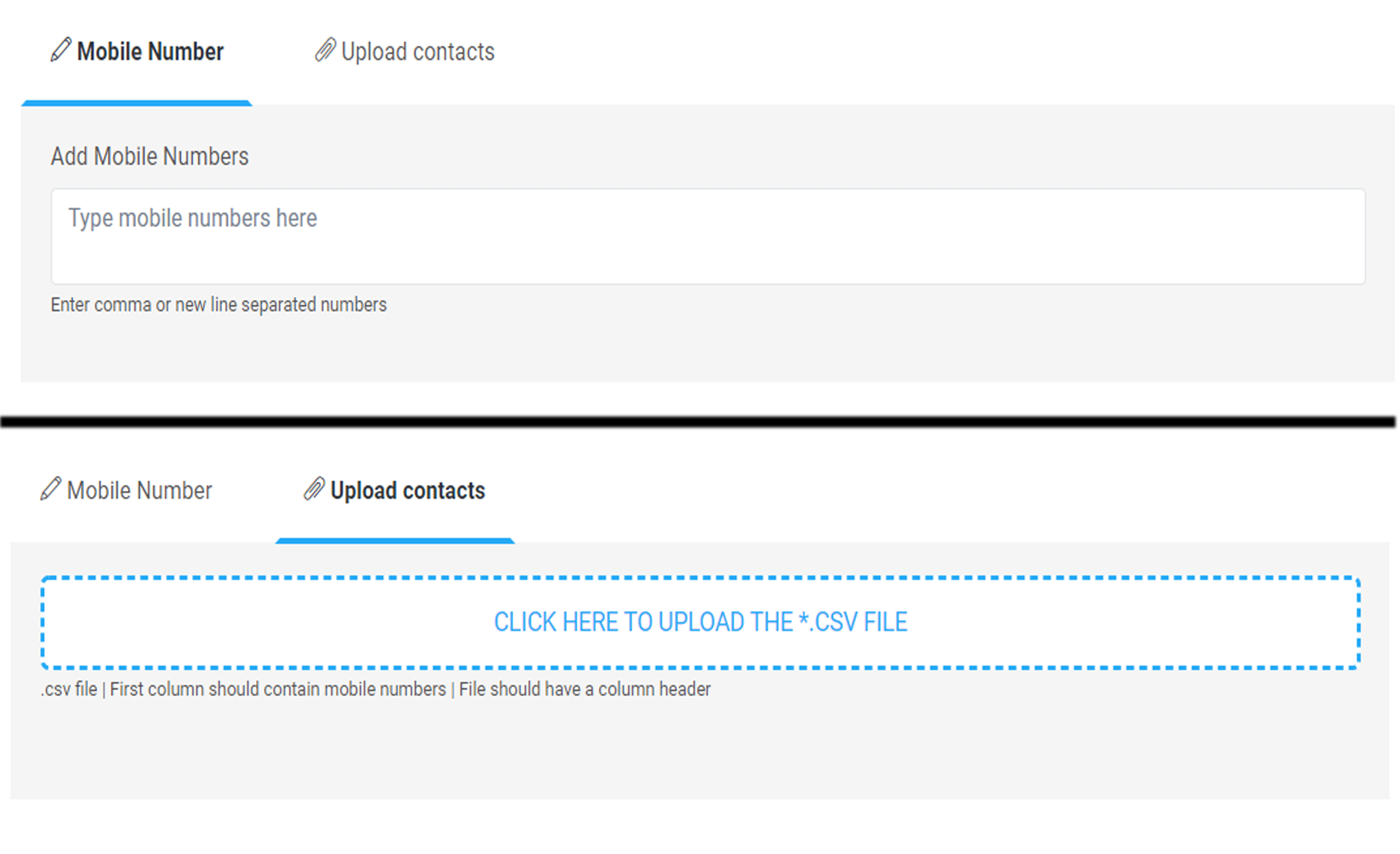
- It is the section where user can add mobile numbers manually or shall be able to upload contact as a CSV file
- In another words it is also called as Campaign Audience manager
- When a user is entering the number he or she will get an access to enter number by separating with a comma.
- Refer screen below for more information. -
¶ Message
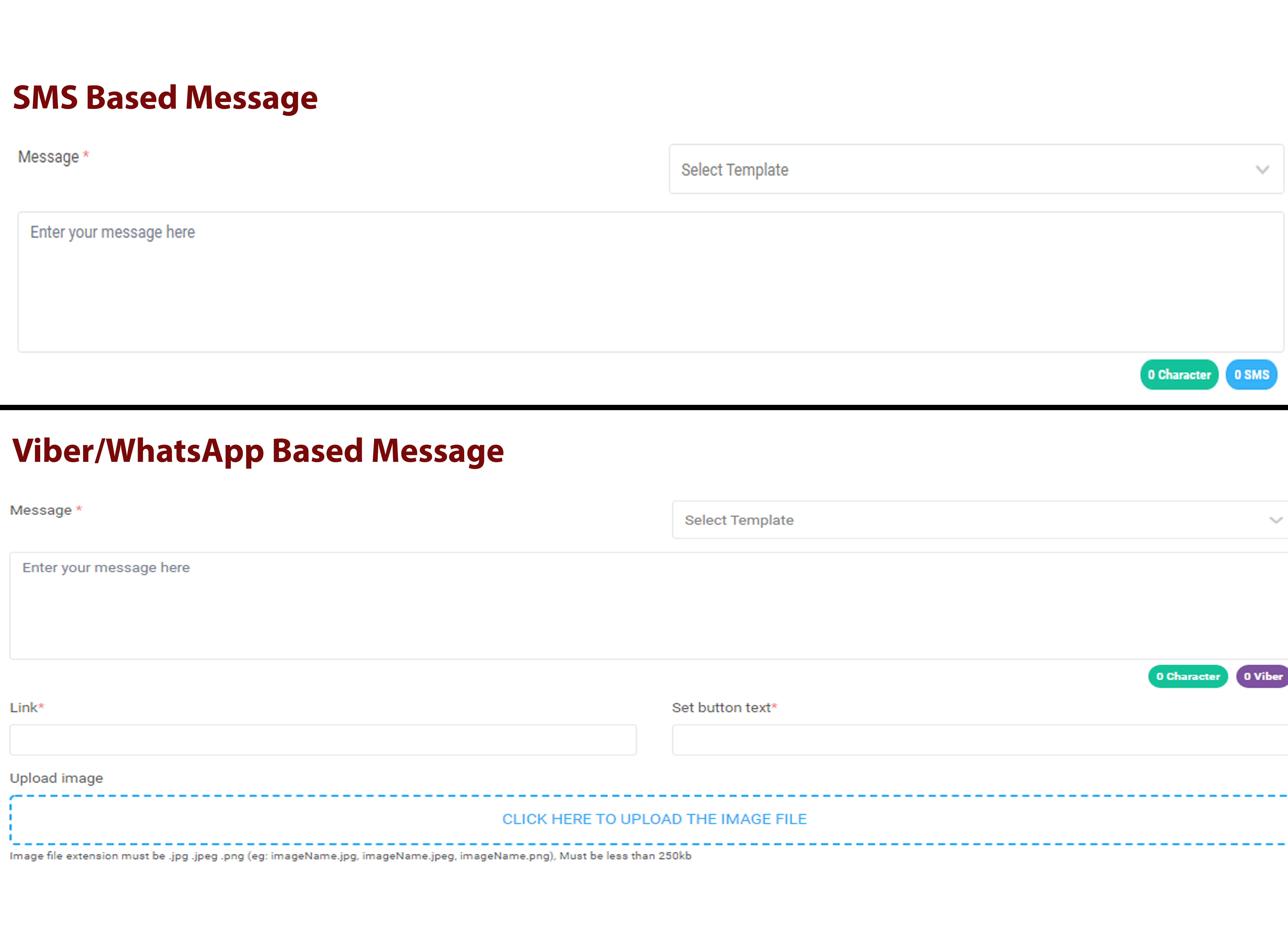
- Based on the selected channel the user will get an access to update the messages
- If user is selecting SMS as channel he
or
she can do following activities.
- Select SMS template - Template will be displayed based on the selected channel
- Enter or view message
- If a user is selecting Viber or WhatsApp as
channel he or she will get an access to do following activities
- Select SMS template - Template will be displayed based on the selected channel
- Enter or view message
- Link - Navigating website
- Button Text - Text to be displayed for the selected button
- Upload image - Upload image which is going to be sent to the end customer.
- Maximum of 256KB allowed with jpg, jpeg and png format.
- If a user is not using Viber or WhatsApp he or she will get a message in SMS but only the message not the image or link. It will happen based on the campaign type.
- Refer screen below how the flow will look like
- It is a type of campaign which is created for external purposes. Here a user can create campaigns and generate API details which is going to be connected with external applications.
- User shall be able to do API campaign for both SMS and Viber
- Once the API campaign was configured the user
should
be able to get 2 API information which are as follows.
- API ID
- API Key
- In order to carryout API campaign the user has to enable to API Campaign under Campaign Type
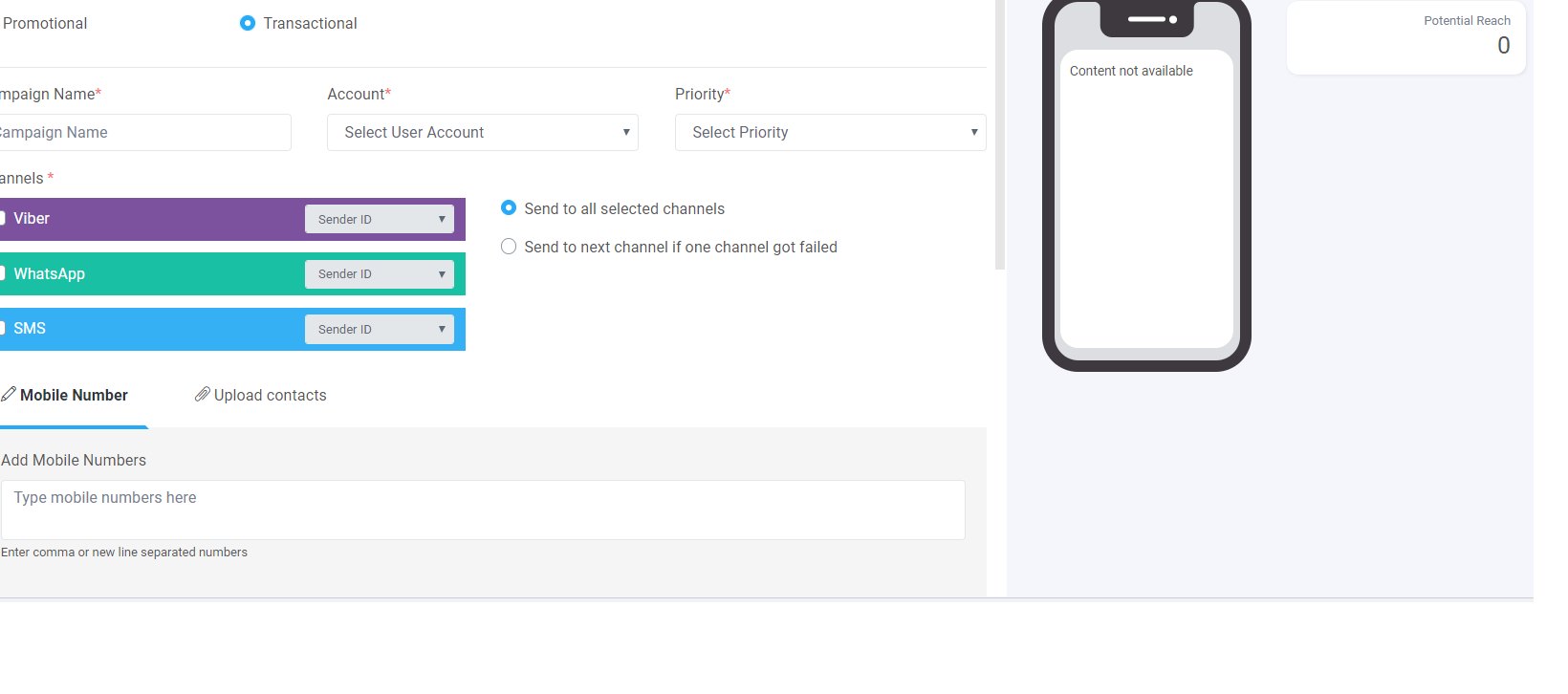
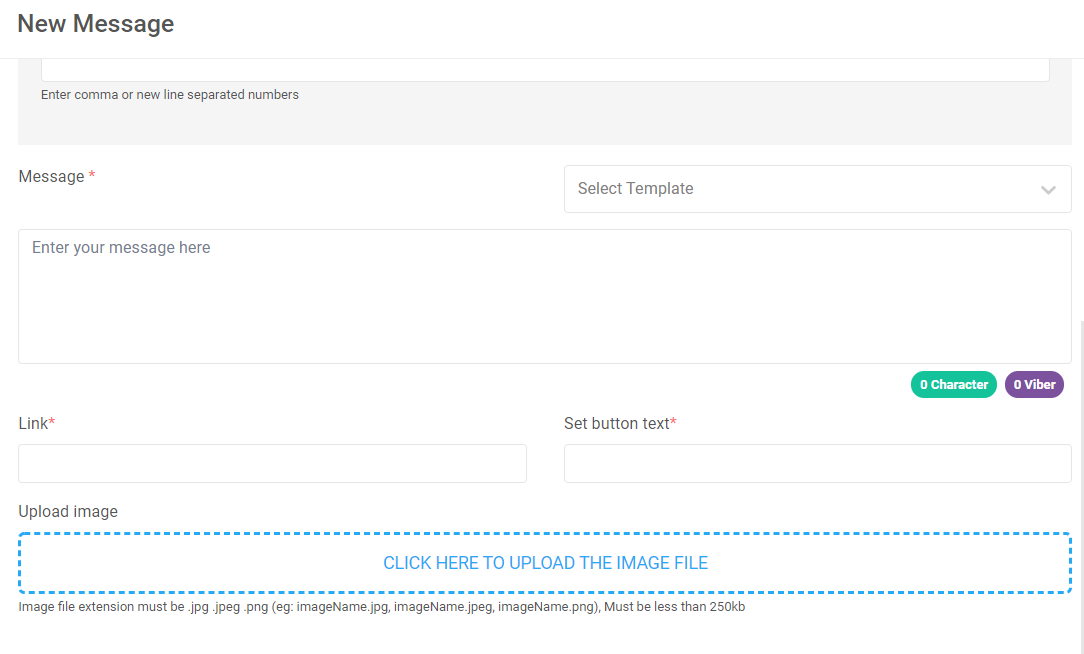
- It is an ID which is configured based on the selected account from Back End.
- In order to configure the sender ID user has to select the channel type and
- There are 3 different API’s for 3 channels.
- Refer Campaign Creation Screen below.
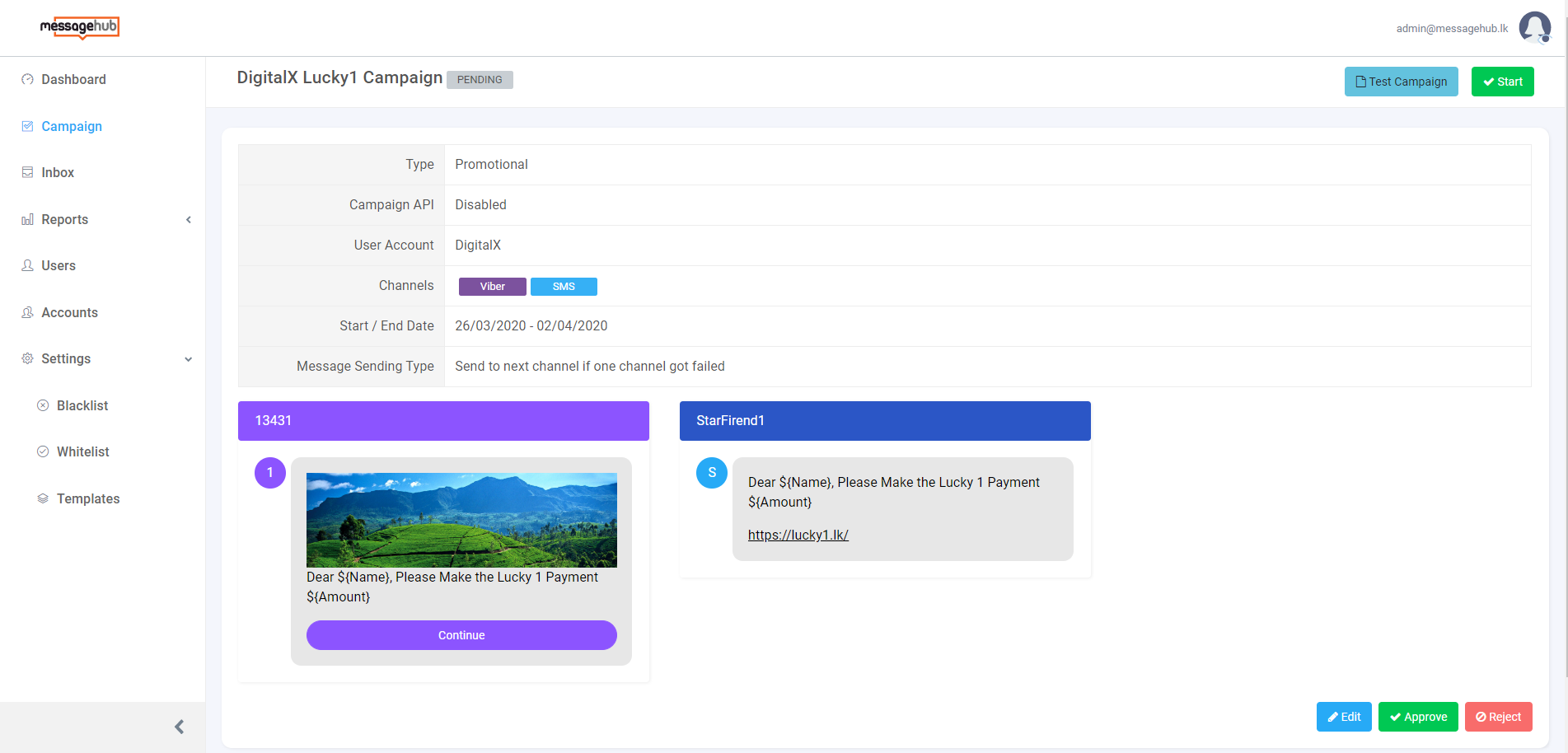
- Once after creating a campaign the user will get an access to view the campaign summary before starting.
- Following information can be
viewed
- Campaign Type - Promotional/ Transactional
- Campaign API - Enable or Disable
- User Account
- Channel - Viber/ SMS/WhatsApp
- Start/End Date
- Message Sending Type
- Message View as Viber/SMS
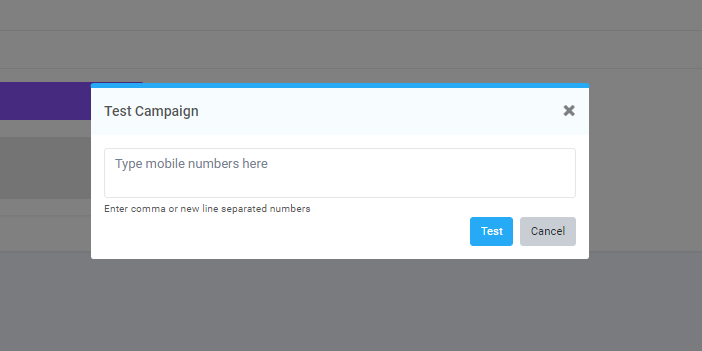
- Users can do a test campaign and check before starting the campaign.
- Button description in the campaign summary screen.
- When a user is selected for the Test Campaign he or she will get access to do a Comprehensive campaign teat.
- Parameter description for Campaign for running a test campaign
- Refer Screen below for test campaign management-
- Refer Screen below Campaign Summary
- Under this section, the user can view the campaign detail as a summary
- Campaign summary details will get changed based on status. Refer the table below for more information.
- Under this section, the user will get access to edit the campaign information
- Based on the above-mentioned status the user will get access to edit the campaign
- User can only edit following information in
the
campaign
- Campaign Name
- Campaign Priority
- Campaign Channel
- Campaign Channel action
- Contacts
- Messages and Schedule functionality
- User can edit campaign only when it is in the
following status
- Pending
- Low credit
- Pause
- On-hold
¶ API Campaign
¶ Sender ID Configuration
¶ View Campaign - Campaign Under Pending Status
|
Button |
Redirect page |
Condition |
Description |
|
Test Campaign |
Test Campaign with any numbers |
N/A |
User can test campaign with any contact numbers |
|
Start |
Start the Campaign |
N/A |
User can do immediate campaign start |
|
Edit |
Edit the campaign |
N/A |
User will get access to edit the campaign |
|
Approve |
Approve the crated campaign |
User should have permission to approve User cannot approve that was created by themself |
User can approve the campaign |
|
Reject |
Reject the Campaign |
User should have permission to Reject User cannot reject that was created by themself |
User can reject a campaign |
|
Parameter |
Field type |
Validation |
Usage |
|
Enter Numbers |
Text Box |
Optional, Minimum of 10 and maximum of 15 |
A user can do test before starting a campaign by entering any numbers User has to enter numbers separated by commas |
¶ Campaign Summary Page
|
Status |
Campaign Summary Action |
|
Pending |
Test Campaign, Force Start Campaign, Edit Campaign, Approve and Reject Campaign |
|
Rejected |
Only view campaign summary cannot do any action |
|
Running |
Stop/ Pause Campaign |
|
Low Credit |
Edit Campaign |
|
Stopped |
Only view campaign summary cannot do any action |
|
Paused |
Force Start again, Edit and Stop campaign |
|
OhHold |
Edit, Pause and Stop campaign |
|
Expired |
Only view campaign summary cannot do any action |